

Overview & Importance of the Mentions Tab
Move from high level charts to individual conversations using the Mentions tab.



Move from high-level charts to individual conversations using the Mentions tab.
The Mentions Tab is where you move from high-level charts to individual conversations. It’s the place to:
- Read what people actually said.
- Understand context around spikes or trends.
- Tag, organise, and export mentions for deeper analysis or reporting.
- Engage or route items to other teams (depending on your workflow).
If the dashboard answers “what is happening?”, the Mentions Tab answers “what exactly are people saying, and where?”.
5.1 What Is the Mentions Tab?
The Mentions Tab is a live, filterable feed of all mentions captured by Kommon Poll for your selected project(s) and filters. Each row or card represents a single post, comment, review, article, or similar item.
Why It Matters
While aggregated metrics tell you how big something is, the Mentions Tab tells you:
- The exact wording of posts and comments.
- Tone and nuance that sentiment scores can’t fully capture.
- Context around crises or praise (what triggered responses, how others reacted).
- Specific examples you can share with stakeholders or in reports.
Main Data Sources
The feed can include mentions from:
- Social media (Facebook, Instagram, X, YouTube, TikTok, etc.).
- News and blogs.
- Forums and discussion boards (where supported).
- Reviews and ratings platforms.
- WhatsApp or messaging integrations (if enabled).
The actual sources displayed depend on your project configuration and data integrations.
5.2 Overview Tab Snapshot
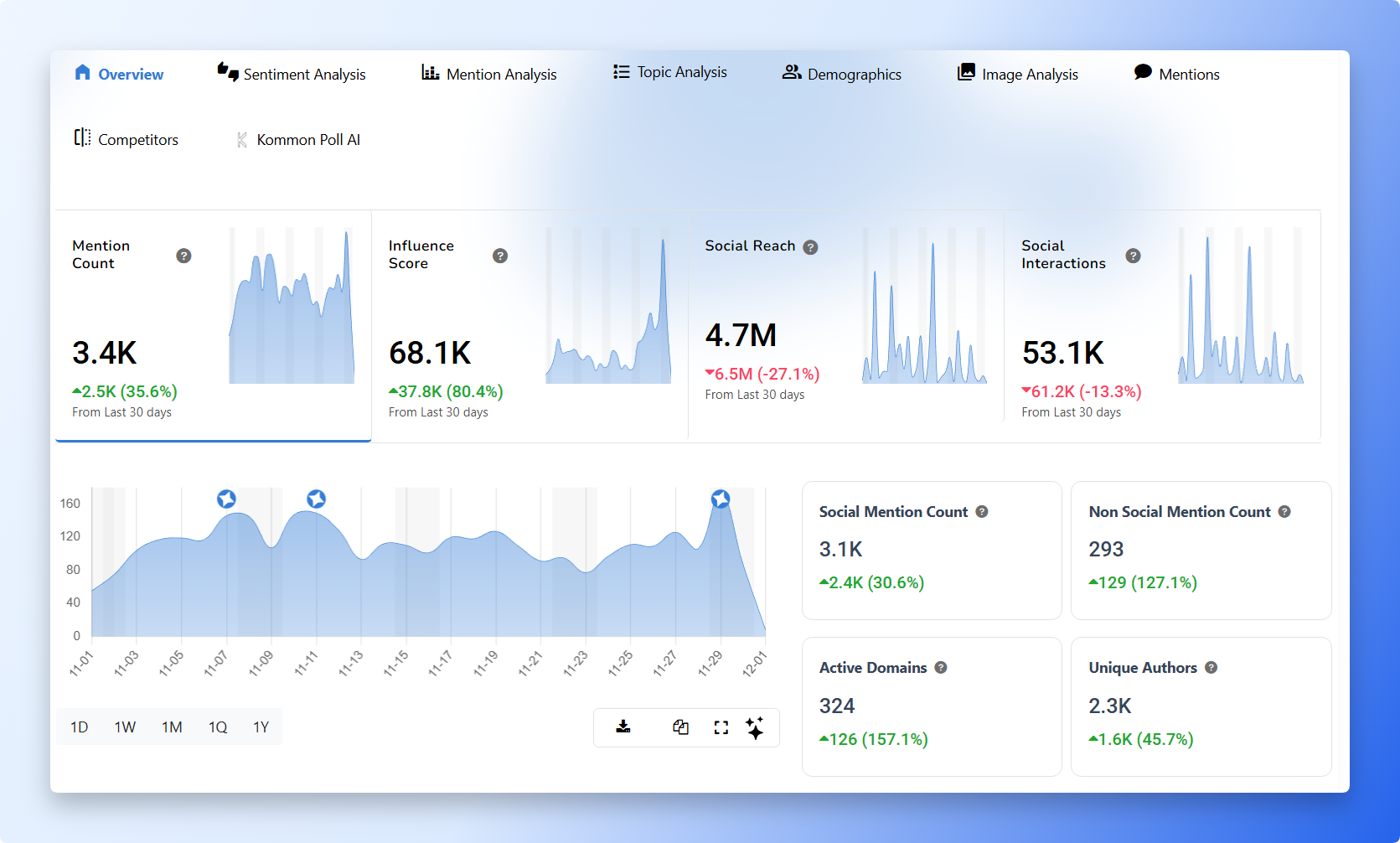
The Overview tab keeps the top section dedicated to the highest-level KPIs so you can instantly gauge momentum:
- Mention Count – Total mentions detected in the selected time period, showing the conversation volume.
- Influence Score – How impactful the mentions are, with higher values driven by strong profiles or publications.
- Social Reach – Estimated potential audience that could have seen the mentions; more reach equals wider exposure.
- Social Interactions – Engagement on social media (likes, shares, comments, reactions) tied to the mentions.
5.3 Additional Overview Insights
Below the KPIs, the Overview tab surfaces these supporting insights:
- Social Mention Count – Mentions from social platforms only (Facebook, Instagram, X, TikTok, YouTube, etc.).
- Non-Social Mention Count – Mentions pulled from blogs, news, forums, reviews, and other web sources for a broader media view.
- Active Domains – The number of unique websites creating mentions, helpful for spotting media diversity.
- Unique Authors – How many distinct authors, accounts, or profiles contributed mentions, showing whether the conversation is wide or concentrated.
- Mention Trend Graph – A time-based line that reveals peaks, spikes, and rhythm in conversation over the selected window.
Together, these tiles and supporting insights give you a quick high-level view of who is talking about your brand, where they appear, and how the tone evolves over time.